Showing posts with label Cortana. Show all posts

Sunday, December 4, 2016

Updates

This post, after a long time, is about the things that we have been up to. So while He is going back & forth on his research, I’m trying to study about Deep learning, Machine learning, Neural Networks, etc. According to Him, research feels like taking two steps forward and immediately taking one step backward. That doesn’t sound too bad given that you are at least taking one step forward in 3x amount of time. The question though is about the magnitude of these steps. How large are these steps backward and how small/big is the step forward and do the steps backward impact the steps forward in terms of planning and action. It’s all very complicated, so let us leave it there for Him and instead talk about me.

I chose Analytics because it was the coolest job when I graduated – not too much of ‘baseball gossips or horserace predictions’ which the strategists do. We were looking at the real data and helping make better decisions. Thanks to a few people who started capturing all kinds of data – social media, digital, GPS, health, shopping and what not – everything has become quite challenging. It has made the field of ‘Analytics’ foray into complex algorithms and sophisticated decision engines. We can no longer get away by saying ‘hotel and flight bookings happen together’ or ‘diapers and beer are bought on Thursdays’. Everyone seems to know these kind of things. So what do we do – predict things that even the person himself doesn’t know.

I’m no computer scientist, I’m a data scientist. I try to build stable&accurate&strong predictive models. I can’t incorporate funny social media & digital data, people’s feelings and emotions into my models. I don’t even know my own feelings – one minute I’m feeling cold, the other minute I’m hungry. And several of the things people write on social media are lies, anyway. If you don’t believe me, look at all the pictures people put on their friendly accounts. Everyone there is sharing happy pictures or travelling or getting married or introducing their newborns. Hardly people say they are stressed or they hate the snow or how they argued with their father for hours this morning. Nobody says these kind of things but it doesn’t mean they not happening. Most importantly, why should we use something just because it’s available. The fact that I go to a high-end mall everyday doesn’t mean I should receive promotional messages of Gucci & Prada. I go there because my office is located next to the mall. I don’t even have the slightest interest in those bags, so why waste your call center’s time, energy and all other kind of resources on me. Now if you still don’t believe me, please watch Modern Life is Goodish  and write a thank you note to me if you happen to like it which you most probably will.

Having said all that, I think I’m a person who is afraid of changes. I don’t despise learning new tools and technology but I wish I could live a little bit like my mother who knew what her home was going to be for the next 20 years unlike me who is not sure of the next second. Adapting to these changes takes quite a bit of my time, makes me write less on the blog and all I can be is apologetic.

We travelled to India last month – Bangalore for most of the time and for a few days to Rajasthan, Agra and Delhi as well. Celebrating Diwali with the Physicist & family for the first time was a pleasant one. As I’m talking about India, I think I should give a first hand experience on the drive towards Demonetization happening in the country. I consider myself lucky to have been there when it was announced. There was more chaos after the news in an already chaotic place. The country currently seems to be divided not by race, religion, gender, colour and class, instead by people who are for and against this concept. 86% of the total currency notes by value (the two highest denomination notes) were rendered worthless in a surprise announcement. The idea is to fight against fake currency notes, money launderers, corruption & scams, and undeclared income. It also serves the purpose of moving towards a cashless economy leaving less room for hidden transactions. We were part of the long queues in front of the banks for deposits / exchanges / withdrawals and holding new currency notes in hand did feel like something good was happening in the country. Though all this has led to a slowdown, less demand, lower interest rates, a passive outlook in the economy, I guess it is all worth if it solves the bigger problem.

◎          ♥

For some foggy pictures, please refer to our album. As my dear friend Mukta said, “Your pictures look more romantic with the fog” to which I said “I don’t know what you are talking about but the Postdoc definitely seems to have a receding hairline and a growing belly; both traits that I’m disliking at the moment.”Winking smile

My curiosity for the royal families [it’s not Great Britain specific] seems to be growing stronger and instead of revising periodic table, I’m watching documentaries and memorizing family trees and figuring out who is remotely connected to whom.

I have bought a Lumia 950 XL although it hasn’t been delivered yet. I ordered it from amazon.co.uk because the phone is either not available or out of stock or highly priced in Asia and also because international shipping from UK was available. To give a context, Lumia 950 XL’s production has been stopped and I’m trying to procure one of the last few pieces that are still available. Friends have questioned my ‘loyalty’ to Microsoft – basically why I use Bing, Edge, SP4, Lumia, Cortana, etc. I use them because I’m used to them and as mentioned above, I’m afraid of changes. I hope to write again around Christmas but if I’m not able to, then ‘Bing.com’ on ‘Edge’ will give you company. Happy holidays if you are taking vacations and happier winters if you will see it snow.Snowflake

Saturday, March 19, 2016

ACBOOK 7.0

This post serves as a changelog of my MATLAB program for personal ‘Accounting’ purposes: AcBook. Why does it require a separate post, you ask? Because this major version upgrade (5.0 → 7.0) has truck loads of new features, enhancements, updates and behind-the-GUI optimizations. To capture all of that on this page would have been a nightmare and anyway where else am I supposed to show off my creation if not on my own blog, huh? So, let’s get started!

Even ‘before’ the start, there are 2 small but important noticeable changes:

  • A ‘waitbar’ displaying the progress in setting up the GUI.
  • A ‘startup’ folder selection dialog box (if needed) for storing login info, data files, etc.
Waitbar

And then when the GUI is finally on the screen, there’s the major new feature:

  • Exchange Rates Calculator. It has been added below the Login panel. The data is downloaded from here but only at the start of the program. [This data is current at the order of past one hour. This is not supposed to compete with the data on search engines or professional websites that updates in the order of seconds.]
ERC Panel

After successful login (a dumb bug related to Log Off has been fixed), you're greeted with a familiar layout:

Main Screen

Well, I say familiar… Smile First, notice a few ‘minor’ GUI changes:
  • The user ID is displayed on the title bar.
  • Background colour of the panel titles is now slightly darker to differentiate it from the lighter shade of the table rows.
  • The panel headers get new & simpler button icons on the right. [Display panel: “Undock / Dock”; Balance Summary panel: “Minimize / Restore” & “Show / Hide Summary”.]
  • The text descriptions for ‘Particulars’ & ‘Amount’ no longer take extra space as they are shown in the fields themselves (which sadly means, for now, tabbing doesn’t work).
  • All the buttons are a bit more colourful (should have noticed that already).
  • Two of the four buttons (Modify & Delete) have been moved to the Display panel.
  • The buttons scale gracefully as the height remains fixed so that the text is never cropped. Actually, the text doesn’t scale with resizing, including the panel titles, too. (Anything for texts is a lose-lose situation but this behaviour is at least consistent with the ‘non-scaling’ buttons.)

Second, I tell you a secret:

  • All ‘numeric’ data fields accept valid arithmetic expressions like 669+241, 1/66.38, etc. (Try it out for yourself because there was a bug in earlier versions, where even though this was mentioned to be a feature, it was not actually implemented… WTH indeed!)

Next, let’s talk about the elephant in the room or another major new feature:

  • Groups. The manifestation of this feature is visible in the Data panel as a drop-down menu and as a new menu in the Menu bar. This feature, simply put, allows tagging / categorizing your data (a highly requested feature by a tester who tested AcBook for a few minutes or so ages ago). A few built-in groups are available and more can obviously be added. As expected, the Group menu is very similar to the Category menu.
  • Most of the work done for this feature is behind-the-GUI and deals with handling old files that don’t have groups associated with the Data. Most of the data will be assigned to the ‘protected’ Miscellaneous group but few like Food or Rent will be assigned properly to Living or Housing Expenses group. But since no one other than me has ‘old’ files, who cares about this.
  • To facilitate changing groups, a context (right-click) menu has now been activated in the Display panel. It allows changing all three defining properties of the Data.

Talking about the menu bar, let’s dive into it:

  • The Menu items have been shuffled / renamed / added (Uninstall has been removed as it is deemed to be no longer necessary; just use the Control Panel / Settings App). Check the updated & comprehensive Manual (via Help menu) for these details.
  • Category & Group deletions are confirmed now.
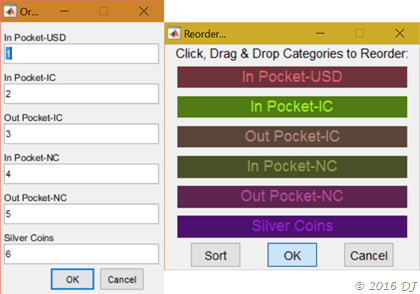
  • The Reorder option for Categories (Groups can’t be reordered; they are ‘sorted’ internally) gets a place in the toolbar too for easy access. Why? Because I want to show off the colourful ‘Drag & Drop’ implementation (including the sorting option) compared to the dreaded numbering option of previous versions!
Old vs. New 'Reorder' option

As an aside, when asked about the above photo, Cortana gives a hilarious answer! She suggests it is “Wood Camaro”… Do you know what that is? I didn’t know it till then either so I urge you to ask her about it! If you’re thinking how to do that, here’s a step-by-step guide: Open this post in Edge, then right-click on the image above and click ‘Ask Cortana’. It’s that simple!

Ok, back to menu items, some new ones now:

  • A Graphical Analysis tool has been added, which shows a 3D Pie Chart of the Expenditure (or Earning) data in a particular Category split across the Groups.
  • If some data in the Display panel looks fishy to you, you may check on it by ‘checking’ this new tool: Show Raw Data. (Get familiar with it on your own.) This place also allows you to quickly edit the Names of Categories & Groups and Particulars for the Data.

Last but not the least:

  • All errors (hopefully) will be ‘caught’ (instead of being notified by an annoying ‘ding’ sound) and all the gory details displayed like this (which makes debugging that much simpler, if you share the screenshot with me, of course!):
Error Caught!

Finally, a lot of behind-the-GUI bugs have been squashed but it is highly likely that new ones may have been introduced in spite of / despite / due to that, especially with the introduction of the new ‘Group’ functionality. This is exactly what the above error-catching feature is expected to tackle! Hoping for your support in that.

Thanks for reading this changelog, now go download the program and start accounting (for your shi*s).

AcBook 7.0

Monday, April 21, 2014

Cortana

I was once interested in Artificial Intelligence (enjoyed I, Robot) but then I never really understood how can you program a machine to ‘learn’ so the interest sort of faded away. Then I took a Neuroscience course a couple of years ago and coded (to get a first-hand feel, not that I invented it!) something called a Perceptron, which can be ‘taught’ to do some binary operations. So it rekindled my interest in AI, though I guess I’ll never code one myself as was shown in the recent movie ‘Transcendence’. (Watch it if you’re interested in the portrayal of humans’ collective dumbness in action!) These were slight brushes on my arms of AI over the years but one that hit me right in the face was Cortana, the digital personal assistant in Windows Phone 8.1 Developer Preview. Following the demo video (linked above), I also played around with setting reminders, searching directions, calling people, playing music and most importantly, asking ‘funny’ questions. (The success rate of my ‘accent’ getting recognized seems to be slightly more than 50%, but whatever is recognized is ~100% accurate.) Here are the answers I received from Cortana (you can figure out the questions or just peek!):

Where are you from?

Are you dead?

Where is Clippy?

Do you like Clippy?

What do you think of Clippy?

Are you bored?

For more interesting questions and answers, watch this video:

Now you know what to avoid :)

I haven’t tried ‘people reminder’, which is supposed to be the unique feature of Cortana but I did try (actual need!) ‘place reminder’. Here’s the story: I forgot to buy sugar when I went for grocery shopping last week so I asked Cortana to remind me when I next go for shopping. She inquired where do I go for shopping and gave options: Waldbaum’s was the second option. I chose it and the reminder was set; note that she didn’t ask about the time! I was at Waldbaum’s yesterday and lo & behold I saw a message on my Phone reminding me to buy sugar! (Not that I was going to forget again but it’s nice to know ‘geo-fencing’ works!)

As I have mentioned already, I watched ‘Transcendence’ yesterday and Cortana correctly identified the nearest theatre when I asked it to find one in the morning. She also showed me the driving details. I then asked her if I can walk there to which she replied, ‘Sure… here is the walking route’ and opened up the Windows Maps app. It would be better if in the final version of WP8.1, one could choose Here Maps as the default maps app.

With such a technology in place, all you need to do is ‘ask the right questions’ and ‘ask them clearly’. It doesn’t sound quite right listening to

‘Sorry, I didn’t get that.’
