Monday, February 18, 2013

Our Story-I

It was inevitable that after writing His Story and Her Story, we had to write something like ‘Our Story’ and so here it is. A hexology in 3 parts – something off of Hitchhiker’s Guide to Galaxy, which is a trilogy in 4 parts!

So we begin at the beginning and that was on 27th, when we both reached our intermediate destination of New Delhi. She reached her final destination of Sardarshahar (SDSR) on 27th itself but I reached my final destination of SriDungargarh (SDGH) on early morning of 28th. (A bit of asymmetry there but then nature is not particularly fond of perfect symmetries, anyway!)

28th Jan

Here’s my welcoming party around 6AM:

Welcome...

A needed welcome is what I would say, after all He was there on the 28th and did not postpone it till 30th to attend His own wedding! Smile

After a light breakfast and some meetings with crucial (or rather, close) family members, I napped for 2 or so hours and around 10AM, the gravity of the situation finally hit me:

Preparations

Seems like everyone is ready, including the Pundit (priest). Even His seat is ready but empty and we all know the reason. That’s why the womenfolk are singing trying to both wake Him up and welcome Him aboard.

Wow… so many people! Anyway, I got over the shock and took my seat in the center after which some half-an-hour ritual goes through. I was told to keep one of the red threads tied for 1.25 months on my right wrist and hold on to a silver cane (sort-of-like-this) till 30th when the next guy (in our family) wanting to get married would take it! A snapshot of the on-going ritual:
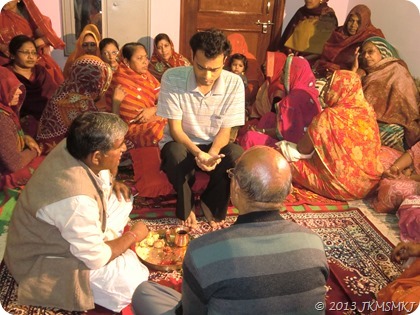
Beginning

Then I had to get ready in a formal suit and was handed a red cloth pouch. A hilarious custom where people (I was guessing kids but NO! It could be any person) ask the groom (he is recognized by his attire obviously; in my case, by the red tilak on my forehead) to give them ‘something’. My pouch contained dry fruits (salted almonds, cashew nuts, and dried apricots) and candies. I handed them to whoever crossed my path till I reached the guest house in the evening (My father took the pouch when I started having dinner at night and I heard later that he was enjoying distributing stuff from the pouch! I got the pouch next day again.):

Arrival-I

All the members of my extended family were invited to this guest house for breakfast, lunch and dinner during the 4 days of the wedding (28-31 Jan). Forgot to mention earlier but along with that cane, I was asked to keep a plastic zipper bag containing salt & rye seeds to ward off any evil omens. Evil omens like this compliment: “He is looking great with the silver tie though.” Smile

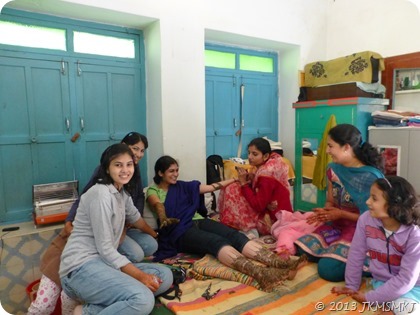
Nothing as complicated as above happened at SDSR. Well… I wasn’t offered that warm welcome Winking smile and I was surrounded by women singers on the 27th. I think they sang about my connection with important family members and how they would miss me when I would leave the house on the 30th. I put on Mehndi on the morning of 28th:

Mehndi

All the cousins surrounded and giggled besides me. They made the long and boring Mehndi-application process quite a fun experience. On the evening of 28th, we left for SDGH and after some delay arrived at the guest house where the Reception was planned.

Arrival-II

We were first taken to one of the guest house rooms where refreshments of all kinds were served. And then we were asked to shift to another room, which was when I caught a glimpse of Him for the first time this year, after our last meeting in June’12. [I caught a ‘glimpse’ of Her already when She entered the guest house. I was standing directly in Her line of sight when She was coming up the stairs just after which the photograph above was taken! How the hell did She miss me then? I was not expecting Him there, thought he would be hiding inside some room escaping the photographers! Winking smile] He was standing with a few other people holding that red pouch. He nodded without saying anything and smiled for nearly 10s (quite an achievement for Him) without moving an inch. [My current plan of action is to make Him show His teeth for nearly 10s while smiling.] Some important conversations happened between our family members in the other room and we were then asked to move to the Reception ground.

A stage was created in the open ground, besides the guest house, where the Reception was held. Quite an elaborate set-up I think. I had wanted things to be as subdued as possible but some things just don’t change given the familial ‘peer pressure’ surrounding these events.

Stage

Anyway, we somehow made it to the stage. Why the hell is one asked to walk slowly on these days? Maybe for all these photographers trying to capture some good shots (with bright lights set up all over the place). So you got to walk slowly and have bright flashes shoved up your nostrils and still these so-called photographers have guts to ask for re-poses because they missed the moments! So here we are trying to appear calm:

Staged

All the family members present during the Reception came and wished  us. We touched their feet and got blessings along with some gifts (mostly cash, though). In the meantime, some exchanges of gifts happened between the family members from His and my side, too. A picture of us when we found some time to sit and chat a bit.

Calmed

We were called for dinner after most of the guests were done with theirs. And it started with a “kuch meetha ho jaye (let’s have some sweets)” moment. There were different kinds of sweets but I relished the “hot and sweet” badam (almond) milk that was served to us in the end.

Sweets

Well, I liked all the sweets and had trouble trying to gulp down all the varieties (who knows when I’ll get to eat them again)! Not just sweets, there were exotic snack items too apart from the usual traditional dinner. Sadly, couldn’t taste everything! Sad smile I think he made it on 28th here (His REAL intention was) just to taste as many sweets as He could. But it seems like, even then the days were short and the sweets too abundant.

29th Jan

Two small events happened during this day both at SDSR and SDGH. The first one where His mother visited her brother’s house and invited him & other cousins ‘formally’ for her son’s wedding. In my case, I visited my Maternal Grandmom’s house and was given gifts. The second one where His mother’s brother & cousins visited her in their house (the guest house, actually) and showered gifts on her. At SDSR, everyone from my Maternal family – grandmoms, uncles, aunts, cousins, acquaintances and friends visited and traditional gifts were exchanged. Pictures from SDSR for these events are not available but below is a snapshot showing Mummy being given a gift of a saree by her Brother.

A token photo from 29th

So, that marks the end of 29th… I wonder what was He doing while Mummy and I were busy the whole day. He was getting over his jet-lag I presume or the worst thing to do at this point of time (He would call it ‘the best thing’) would be solving his research problems. Smile

Well, it was true that I didn’t have much to do but I did need to perform some minor customs around lunch-time and then in the evening when I was free (after taking a nap) I did do some research. That’s a respectable way of saying I edited some bits of my latest paper! Winking smile

Now, let’s move on to the important event of 30th which is coming up in

Part II

Monday, December 31, 2012

Hands on with Lumia 710

I should have probably waited till the end of December or January for the launch of Nokia’s Lumia 920 which is going to be a Win8 phone. My Superpartner thinks that I’m a little impatient to have not waited and that’s true because I bought a Lumia 710 which has Windows 7.5 Mango OS upgradable to Windows 7.8.

I removed the ordinary SIM from my old phone to transfer to this one. I noticed that this one required a mini chip. I told myself that there were 2 options available – either go to the nearest Vodafone store and request a mini SIM (who knows how many days they take to give us one for the same number) or do the necessary bit myself which is cutting (literally cutting it with scissors) the original one on all sides (just ensuring that the little circuitry on the chip is not disturbed). I did the latter and after I inserted the short chip into the ‘Chip holder’ and saw ‘Vodafone In’ on the phone, it seemed like a little accomplishment.

I started playing with the camera of the phone then. This one has a 5 MP camera and there is a key in the right hand side of the phone which activates the camera at one go. And the second press of the same enables one to shoot pictures. On the other hand, one can also touch the screen for a few seconds and get the picture captured. The picture quality is too good and now I understand as to why the Lumias are marketed more as Photography instruments than anything else.

Now let me talk about the most exciting features, which seem to be Nokia’s promoters. Nokia Drive is nothing but ‘fantastic’. You need to turn on your ‘Location identifier’ and this Drive shows you the road you are riding on and when you fix up the destination, it would show you the shortest route to reach the place. One can do intelligent things like fixing up the everyday destination (say, your workplace) and every morning the in-built app would compare the congestion which is there on the different routes and suggest you the best route to take that fine morning. While I was travelling to my hometown last Wednesday, I started comparing the shortest route the App showed me and the route the Auto driver was taking. To my amusement, he took the shortest route possible. So, yes we still have good auto drivers who don’t cheat people by taking circular routes and if we come across such, we have now our own sweet systems to make them take the right routes for us. No wonder people can travel from anywhere to nowhere using this technology (well… “if” you have the right charge points and know how to use your battery efficiently). I also looked at Nokia Maps while I was using Nokia Drive which showed me the speed at which the auto was moving and the route it was taking. This map shows the aerial view of places (one can turn it on or off), traffic conditions on roads, etc. The sensor is too good that any deviation from 0 degree is well captured. Nokia City lens (the application that is bragged by the Mobile stores) on the other hand is like ‘Google Mini Maps’. It shows us a variety of information in the next whatever-radius that we are interested in, like food joints, hotels, shopping places, famous areas, fun elements, sight-seeing, transport and anything that we would like to search for. For example, I can type “Nokia Priority Center” and all the centers in the city would feature in the list, sorted by their nearness to you.

There are 100’s of applications one can download seamlessly from the Marketplace. They have got categories like ‘New and Impressive apps of the week’, ‘Top apps and Games’, ‘New’, etc. I have downloaded two photo-editing softwares inspired by my Superpartner’s extensive use of Photofunia. One is called a 3D photomaker and if you try editing any picture through this maker, it gives you a 3D image. The other one is called a ‘Creative Studio’ and it is quite creative as it works on the photos to create different effects and there are interesting face warps like mega mouth, pinochia, superchia, twister, etc.

There is this Gchat which is primarily created for staying connected to our Google friends. The free version of which reads “It’s not limited or anything because we love you”. If you go to the ‘Related’ section in there, it shows you some 10 other apps one of which is ‘Talk to Girls’. I guess there could not have been a more straight-forward name Smile. There is the current favorite – Watsapp – the free messaging, audio & video sharing software, Youtube to search and look for all kinds of videos, Tunein radio which connects to radio channels all over the world. There is the very colorful timespoynt which gives you weather updates, shows you nearby restaurants, movies and the theatres, latest events happening and even nightlife.

There are all the important MS Office tools – Excel, Word and Powerpoint. There is even Skydrive and Xbox live. We have the MSN India for Online shopping. The phone is complete touch, however there are three buttons at the bottom – one is the back button, one is the ‘Windows’ button and one is the search button, the default search browser is of course Bing and the Bing photos change even when you turn the screen and are updated from day to day.

There is Nokia Music where you can listen to your stored lists or listen to different radio stations or hear unlimited scores from the store. The store names its playlists as ‘Party on your mind’, so if party is in your mind and you don’t have anyone to party around with, turn it on :). I just glanced through some of the apps and found the details of a few quite interesting… Read them while you can.

Jet Set Go: Welcome aboard the next generation of time management. Help April build her budding travel agency empire and fly.

Photobeamer: It’s a new, innovative and easy way to show your pictures on any screen. Just point your Nokia Lumia at any screen.

Impossible Shoota: You are the last survivor of your race, the elite pilot known as Starboxer. Your last and only mission is to take out as many Sho-dan ships as possible before crumbling to their relentless march.

Turn and Run: The world has turned… (what does this even mean). Twist the world around you in order to find a pathway to the cute, big-eared alien’s crashed ship.

Farm frenzy: If you think life in the big city is crazy, wait until you get a load of the country life in Farm frenzy, while managing a wild and wacky farm.

Insects killer: It’s a game where the objective is to kill as many insects as you can while avoiding scorpions.

Make-up girls: The Girls are finally here and they need your sense of style and fashion to get the perfect look.

His&Hers: Find out how much you really know about your nearest and dearest while finding out if they know the real you.

Enjoy! Have a Cheerful New year!

Sunday, December 16, 2012

Enlightenment

That is what has been brought by the recent release of 2 more Sketchbook chapters! First of all, we get to know that Ooba also dreams dreams as weird as Hazuki or Natsumi:

Sketchbook_v08_ch108_056

Second of all, Daichi is still trying to teach Kate correct pronunciation but somehow they end up being tongue-twisters for them:

Sketchbook_v08_ch109_064

We are also shown that opening a candy wrapper is not as easy as it looks and I agree with that. It has happened too many time to me too to ignore laughing at that:

Sketchbook_v08_ch108_058

Finally, the enlightening bit… I almost fainted after seeing Juju-senpai’s fully open eyes for the first time:

Sketchbook_v08_ch108_060

Sunday, November 18, 2012

Upgrades

I recently upgraded from Win7 to Win8. On both of my laptops (I’m going to point out what doesn’t work because they are more interesting to recount than saying that my MATLAB programs work without any fuss!):

Acer Aspire 5610Z

The ‘new’ apps Photos, Music, and Video don’t find files in the respective libraries, which they are supposed to do by default!

Photos

It’s not that these are the primary apps that I have to use so am not much bothered about their dis-functionality. But I liked the Music app in Win8’s Release Preview and if they worked in Win8RP, why the hell don’t they work in Win8?

The shutdown seems to proceed all right but a message always pops up on restart: “Your PC ran into a problem…”:

problem

I just hit “Send Details” and get on with my life.

Fujitsu LifeBook T4410

Fujitsu Shock Sensor and OmniPass Fingerprint Reader are not compatible with Win8. Also mentioned on that page is the fact that the automatic rotation of screen from notebook to tablet mode won’t happen anymore due to Fujitsu (Tablet Controls) settings. That will be taken care by Win8… But in my case, it doesn’t and I have to hit the relevant physical button (see below) to change the screen orientation every time I change modes.

All drivers work fine but the driver for Security Panel Buttons needed to be uninstalled & reinstalled while having UAC settings turned off for the buttons (incl. the one for changing screen orientation) to work. Also doing a few restarts may not hurt before you try to tweak the drivers.

Advice: Suspend BitLocker Encryption & Turn Off TPM before upgrading and be damn sure those panel buttons work after upgrade before you shut off the laptop or you could be in a hell lot of trouble.
Catch: TPM has to be turned on through BIOS after upgrade so if you’ve forgotten that password, leave it alone. It took me 7 tries to get the password right and you do know that the computer locks after 3 wrong tries, don’t you? Thankfully, the button panel was working and I could get on after entering the security code. Anyway, resuming encryption is no hassle after the TPM is turned on.

The webcam doesn’t work in the ‘Modern UI’ apps. It works fine on the Desktop apps. This is when you have Fj Camera (drivers provided by Fujitsu) installed. If you install Microsoft’s USB Video Device driver instead, the webcam works everywhere but the image is flipped! So back to square 1.

I like to think of these as ‘hardware’ issues… Nothing much Win8 can do about them but let me bring to your notice 3 ‘major’ Win8 dum-bass-ery:

1. Win8 sets the maximum brightness level of the screen depending on who knows what. That means you can’t increase the brightness if you want / need to but just decrease it, which is infuriating at times!

2. There is some issue with ‘Personalization’. First of all, the Bing Dynamic theme doesn’t ‘install’ properly. Secondly, the background chooser screen is too slow to load (it was so even in Win7) and then the ‘default’ Windows Desktop Background folder doesn’t show subfolders. [Well, these are issues related to restart I guess so your mileage may vary… as I can now see subfolders when choosing the WDB folder.]

3. The on-screen keyboard doesn’t appear on its own in desktop apps. Let me be precise: In Win7, when you clicked / focused on a text field, a small keyboard icon would pop up near the blinking cursor and you could bring forth the OSK by clicking on that icon. Even if there was no icon (like for gtalk), there would always be a floating edge of the keyboard at the screen’s edge that you could click and get the OSK back. But now in Win8 there are no such visual cues to make it appear on-screen. The keyboard’s icon just sits there on the taskbar and if you’re like me who likes to hide the taskbar to get more screen-space then it is frustrating to click on the text field, go to the task bar, and then click the keyboard icon to make it slide-up on the screen!

Win8 OSK

This is taking a step backward from the better functionality that was provided in the previous OS version, very much like the Live Mesh & SkyDrive debacle. I can not add much to whatever has been said about LM vs. SD already but let me rant away anyway. Why would you go from a ‘generic framework of sharing solutions’ (LM) to a ‘specific partial solution to a sharing problem, which was already taken care by the generic framework’ (SD)? In LM, arbitrary folders could be synced arbitrarily to arbitrary (compatible) devices (SD was just another ‘device’) and shared & synced with arbitrary (≤10) people. This is what I mean by ‘generic’. In SD, only folders in the SkyDrive folder can be synced to ‘arbitrary’ devices with SD now being a permanent device (not that it’s bad but let’s leave that for others to discuss) and they can be shared (just shared and not synced) with arbitrary (?) people. That’s all I have to say for someone to be able to compare what has happened during the transition from LM to SD. [Well… thanks for making things clear. (umm… ‘confusing’ really! Winking smile)]

With the recent update to SD, now at least you can choose which folders (the folders still need to be in SkyDrive folder) sync to which devices (the web storage is still a permanent ‘device’ but that’s expected) but still no syncing of shared folders.

Sync

How can you write “Everything but files shared with you will sync” as an option and not have a thought: “You know what, there should be another option before this saying that Everything including files shared with you will sync”? Anyway, that’s that. [Yeah… and don’t worry if you did not get the head and tail of any of it, Smile I did not either and after enjoying being called dum-bass by him, I figured out that he is trying to state the fact that only your folders are visible in the SD location. Makes complete sense, yes. But if he had shared 3 GB of data with me and I already had 2 GB, I would be losing 5 GB of the 25 GB available to me whereas currently it’s just 2 GB. It is meant to work in a more efficient way, or No? – No. Ideally (efficiently), the folder shared by me showing up in your SD would be more like a placeholder (that links to my SD) and so shouldn’t cost you any storage space. And on top of that, it gives you a choice to sync it to your laptop(s) too if you like (provided your HDD permits)!]

Happy Upgrading!

Sunday, November 11, 2012

Moon-shots

I remember to have taken really pathetic photographs of the moon. The samples are below.

ISO: 1600, Focal Length: 22.4mm

ISO: 1600, Focal Length: 70mm

Your immediate question then is ‘Why are you showing me such samples?’. Well… from there I get to tell you how not to click bad photographs. I was using Canon’s Powershot SX220. And definitely it was not the fault of the camera for the shots to have come out poor, the settings were such. I had set the ISO to 1600 in these pictures and always believed that higher ISO is to be used in dark settings but I realized that it is only partially true, i.e., when you are in low-lit rooms or closed spaces. My Superpartner told me that “Moon is not dark and hence it is very obvious that good pictures won’t come out when I set the ISO to the maximum”. (He talks louder than his normal voice when he is discussing technical stuff!)

Anyway, ignoring him, I was in my native place last fortnight and I tried playing with the manual mode of my Panasonic camera DMC-ZS20. And one picture came out to be interesting. But before I go into showing you the nice one, I will share with you the steps that I followed to get it.

Having learnt about ISO, I started working with Exposure and tried controlling the amount of light reaching the sensors. I fixed up the ISO to 100 and changed the Exposure. As you can see in the pictures below, when the exposure was half a sec, I got a very shaky picture and it appears like two half-moons. It is a bad click from any angle but I have some reasons for liking it too Winking smile. So ½s seems to be too long as the moon is not only a white spot but the hand-shake has been captured too! Then I reduced the exposure time and saw the shakiness disappearing as well as the brightness reducing till at 1/30s, things seemed just about right. It’s still dim as you can notice and to correct that ISO could have been increased but perhaps zooming was a better option at that point.

Exposure: 1/2s

Exposure: 1/4s

Exposure: 1/8s

Exposure: 1/30s

The following .gif file will show you the improvements as Exposure is being changed in the four pictures above.

My next plan then was to increase the Zoom (the above are shot at a modest 25.9mm focal length). Higher zoom resulted in blurred photographs too because of the camera shakes. But you want the lens zoomed out to max focal length so that you get the best possible close-up of the Moon. So the real issue is to deal with the Aperture settings along with the Exposure. The following shots (as you can tell) are from a different night.

ISO: 100, Focal length: 35.6mm, Exposure: 1/20s, Aperture: f/8

ISO: 400, Focal Length: 41.3mm, Exposure: 1/30s, Aperture: f/8

Well, so I put my knowledge through first-hand experience of ISO (keep it low), Zoom (as much as possible), Exposure (low to the extent that the details are sharp), Aperture (let as much light to fall on the sensors as possible but avoid over-exposure) together and finally, here is the self-proclaimed nice image.

ISO: 200, Focal Length: 41.3mm, Exposure: 1/160s, Aperture: f/8

I’m still an amateur and currently wondering if there could have been the best picture that I could have shared with you with a setting of say, ISO: 200; Focal Length: 41.3 mm; Exposure: 1/60s; Aperture: f/5.4. Who knows?

Acknowledgements: My Superpartner for creating the .gif file, for teaching me all these technical details and for the beautiful Cherry-red Panasonic camera itself.

Wednesday, October 31, 2012

Shers She Shared

People search weird things and land up here. Here’s another example:

Intro
Someone wants to hear Surendra Sharma’s interview. Well, Don’t search in Google; search in YouTube already! And then someone wants to introduce oneself with the help of shers… WOW! What an ambition. I just want to be able to utter one simple sentence without any stammering and stuttering and hesitation in contrast to what I seem to do most of the time: “Oh… Hi! ya… umm… I’m Dharmesh.”!

Anyway, here are some shers courtesy of my superpartner’s pen but without any translations (to fill-up this month’s posts quota):

When Her relatives bug Her with questions about me:

ये जो इलज़ाम हम पर हर दिन लगते हैं काश उन्हें भी तो पता चले
दिल का धडकना, मुस्कुराके सहम जाना काबिले-तारीफ नहीं तो और क्या है

When She was surrounded by the mesmerizing weather at Kolkata:

बारिश का समा है, बहारें नौजवाँ हैं
ऐसे में तुम कहाँ हो और हम कहाँ हैं

When I suggested I have never uttered harsh words to Her:

प्यार मोहब्बत कि बातें वो किसी और से सीखने जा रहे थे
पास बैठे थे हम और वो अपनी किस्मत पे रोये जा रहे थे

इज़हार जब किया हमने, तब उन्हें ये समझ में आया
कितने नादान थे वो, जो अकेले जिंदगी जिए जा रहे थे

When I doubted that the above shers were Her original creations:

दिल दुखाया है मैंने तुम्हारा ऐसे ही कई बार
दी है इजाज़त इसकी तुमने ये है अच्छी बात

फायदा उठाने का मुझे कोई शौक़ नहीं है
ये गलतफ़हमी नहीं रखना कभी अपने पास

When She thought of being philosophical without me provoking Her, which has also led the length of the two lines to not quite match [;)]:

ज़िंदगी में कई ठोकरें खाई हैं हमने
वो आए हैं तो उनसे जूंझकर निकलने की हिम्मत आई है

When She was in the mood of bugging me:

बड़े बेमिसाल लग रहे हैं आज
क्या कुछ चटपटा छुपा रहे हैं आप?

कभी लगता है हमारा इम्तिहान लिया जा रहा है
प्यार में अब क्यूँ ये भी नहीं सहा जा रहा है

I poked my nose in between just like that:

मेरे तो जी भर कर बहुत इम्तिहान लिए
जब देने का वक़्त आया तो शायरी कर लिए?

She continued:

काश आप ऐसे ही लिखते रहें
हमारे दिल को खुश करते रहें

हम जी यूँ ही बहलाते रहें
आपकी यादों में आते रहें

When I said I’m going to sleep instead of talking to Her:

वैसे तो आपसे तू-तू मैं-मैं करना बड़ा अच्छा लगता है
लेकिन आज जो आप नहीं हैं सोचे चैन की नींद लेते हैं

When I shared some shers with Her from Anubhuti:

दिन की थकान झट में दूर हो गयी
आपने सुनाई जो शायरी, शाम रंगीन हो गयी।

–Snehil Sethia (स्नेहिल सेठिया)

Well, that’s too much of the so-called & well-hated ‘romantic’ poetry. Such close proximity to it makes my head twitch, my eyes droop, my ears dry up, and my hands ache so I need to rest now. You may continue with

something Else

Monday, October 29, 2012

Kitchens from India

Remember that post I wrote ages ago? No, you say! I mean this one, where I reviewed Amy’s Mattar Paneer.

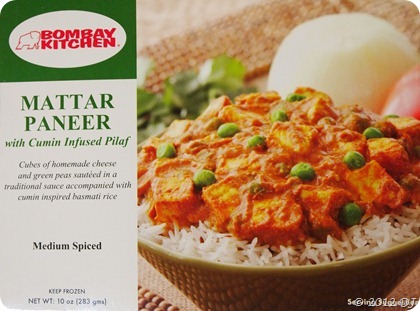
Well, I thought I’d do a similar thing for this week’s post! I had bought Bombay Kitchen’s Mattar Paneer a few weeks back. This (cheaper than Amy’s) product had the following packaging with a dumb serving suggestion:

Packaging

Who the hell eats mattar paneer with rice and that also with the former just poured over the latter? Anyway, the actual setting of the material inside was more ridiculous:

Contents

Put some more rice in there, dammit! I had to slurp the gravy at the end of this meal with no rice left to soak in it! I didn’t count the pieces of paneer cubes this time but at least half a dozen should have been there. The dish overall was good, especially its smell but the taste was quite bland. Well, bland is a strong word so let me rephrase it to say that though it felt nice to eat, something felt amiss.

That’s all I want to rant right now… I mean what’s the point of life if your superpartner doesn’t eat paneer, anyway? So fast forwarding to ratings:

  • Aroma – 1
  • Flavour – ½
  • Texture – 1
  • Bliss – ½

I’d give it a rating of 4/5. Check out

another Kitchen

Tuesday, October 16, 2012

Freeze…

… NOT you! The OTHERS.

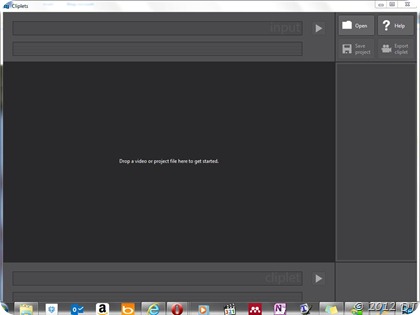
That may give you a vision of some robbery/heist-comedy movie like this but here I’m talking about MS Research’s new endeavour with photos: Cliplets.

Cliplets' GUI

Look at this video to see what it does.

Cliplets Tutorial

Watching these tutorials is sort of crucial because the GUI itself is not so user-friendly i.e. self-explanatory (unless I guess you’re into non-trivial video editing) but once you watch these videos you will feel at the top of the world!

So who, in their sane minds, wouldn’t want to give this ‘app’ a try themselves? That’s what I thought, so I downloaded it and started to make a cliplet. But I was stuck at that point because I don’t have any good videos from which something even remotely interesting could be made.

After searching through 3-4 highly shaky videos, I settled on this one (the video below is no longer shaky because YouTube asked me if I wanted to stabilize the video and I agreed):

Pigeons at KTM

After 5 minutes of trying to choose a suitable portion in the video to animate (you can import only 10 seconds of a video into this app) and another 10 minutes to get the mask right, I finally had the following cliplet in my hands (metaphorically) to call my own! [Points or well-wishes or phone call(s) from me if you can figure out the animated interval of the cliplet correctly in the video above…]

Pigeon(s)

Saturday, October 6, 2012

Jam-packed

That’s what Sketchbook’s just-released 2 chapters are… Jam-packed with jocular situations! Though Sora doesn’t appear till the very end of the second chapter, other club members along with Minamo take a great jab at the job of delivering endless jokes!

Here are 3 sample strips from those 2 chapters (it was very hard picking these out of the equally hilarious other strips):

Sketchbook_v08_ch106_042

I wish I could take compliments as well as Juju Sasaki! Sad smile

Sketchbook_v08_ch107_046

Hahaha… “that person!” This strip made my day! Winking smile

Sketchbook_v08_ch107_050

Considering I now own a tripod too, this strip has hit more than one spot! Smile

When my superpartner first read this strip, She thought Nagisa was trying to click some shots in the air. When I heard of that, I could hardly contain my contempt-filled-laughter and told Her so: “Sketchbook is not your cup of tea”!

She didn’t like that… She Really didn’t like that! So I thought I would give Her some space in this post to make up for my bragging (which I even do on my G+ profile). She says, “I particularly like this strip:

Sketchbook_v08_ch106_044

because it reminded me of the Engineering days, when students who were not part of any Club or Department were called something similar to the ‘Going Home Club’. The beauty of this strip is the expression in the last panel.”

Anyway, care for some more

JAM