Since you’ve been gone, I’ve been alone
Like an arm without a bone
Dangling limply like a phone that’s out of charge
Like Homer without Marge
Like an egg without a spoon
Like a dugong on the Moon
Like a clownfish without Nemo
Like Twilight without Emo
Like Hardy without Laurel
Like high ground without the moral
Like Disney without Walt
Like battery without assault
Like a pet shop without gerbils
Like Hitler without Göbbels
Running naked through a wedding
Driving fast, way out past ReadingChildren slaughter kittens, playing with a nail gun…
Children’s laughter, kittens playing, Withnail and I, gone are these pleasures
Like a dilemma without the di
Just a lemma and a sigh
Like déjà without vu
I am nothing without you
Till the day that you come back
I’m like Whitney without crack.
-Bill Bailey (Dandelion Mind)
Monday, February 14, 2011
Since You’ve been Gone, I’ve been Alone
 Superspace Explorer, Path Localizer, Discharged Photographer, Outdated Programmer, Jack of 'all' Solvers
Monday, February 7, 2011
Moving on…
In this post, I’m going to rant about
SUDOKU SOLVER
, its origin, appearance and functionalities. The idea for SS originated in my head after Shantanu tried to teach me (well, I did ask him!) how to solve a Sudoku. It was during one of the CMP Lab hours of Autumn’05 before Puja holidays. He taught me a ‘human’ variant of the logic ‘Deduction & Reduction’ apart from looking for ‘Single Possibilities’ as described later.
It seemed to me that these ‘Logics’ could be coded and a logical Sudoku Solver made, which would mimic how ‘I’ would solve one! I thought about this quite a lot over the holidays and even came up with two more Logics ‘Deduction from doublets’ & ‘Reduction to doublets’. Later, these were generalized to ‘Deduction from Multi-sets’ & ‘Reduction to Multi-sets’. Two more logics ‘Deduction from Num-Grids’ & ‘Deduction from Num-Chains’ were added subsequently. Each Logic is assigned a number (like 3 for SP) which are summed, depending on ‘how much’ Logic goes into solving, to give a Sudoku its numerical score and assign one of the ten difficulty levels: ‘Easiest’, ‘V. Easy’, ’Easy’, ‘Below Average’, ‘Average’, ‘Above Average’, ‘Hard’, ‘V. Hard’, ‘Hardest’ & ‘Out of the World’.
I decided that the major version number should reflect the number of Logics coded and the minor version should reflect… my Whim! The GUI for SS has remained the same since its inception. Though, the three menus (‘File’, ‘Tools’ & ‘Help’) have gained a few additions over time. Have a look at the oldest & the newest GUI:

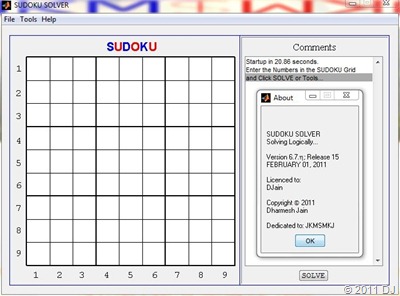
You can obviously Solve a Sudoku Completely but even Partially, which basically displays all the possibilities of individual (≤ 81) cells! However, there is no option of interrupting the (complete) solver and demanding the ‘partial’ results. (It is a Solver not a Trainer!) At first, I thought of not adding a Brute Force Algorithm but the graphics aspect of updating numbers while the recursive algorithm ran led me to include it! I also included an option ‘Use Logic’ but it can not be unchecked by usual means! The most latest addition is Speech Recognition, which allows one to input numbers by speaking them out loud as seen in this video:
SS features a silly ‘security’ feature which supposedly prevents one from running the executable file of one computer on another! SS also asks for your name on the very first start to ‘license’ the program to you, which is displayed in ‘About SS’. It also saves the last Sudoku you solved for easy retrieval apart from providing usual functions like ‘Import’ & ‘Save’. You can also ‘Print’ the current screen to a .jpg file or a MATLAB figure. A Help file (accessible via ‘SS Know-How’) is included with the program along with a link to this post via ‘Learn SS Logic’. The latest release also has ‘Update’ & ‘Uninstall’ options!
This blog post will take place of the earlier Logic.pdf file as I link to the Site, which has an extensive collection of Logics used in Solving a Sudoku. The names (& possibly the implementation) of the ‘Strategies’ on that site differ from the names of the Logics in my Solver! In what follows, I’ll point out the many-to-one correspondence of the Strategies (30 excluding the Uniqueness & Trial and Error strategies) and Logics (6) below in [square brackets].
v1.0; Release 0 (2005) Single Possibilities [1, 2]
The simplest logic: Fill-in the single possibility for the particular cell! It can be represented in 4 ways:
Cell(R,C):N => Only no. (Abs. [Row, Col., Squ.])
R stands for Row (vertical numbers), C stands for Column (horizontal numbers) & N stands for the number filled in the specified cell.
v2.0; Release 0 (2005) Deduction & Reduction [6, 7]
Again 4 representations are possible here:
Squ.[sR,sC] & Row [Col.] R [C]: N =>
N removed from Row [Col.] R [C]
Row [Col.] R [C] & Squ.[sR,sC]: N =>
N removed from Squ.[sR,sC]
v3.0; Release 1 (2005) Reduction to Multi-sets [4]
3 representations are possible corresponding to 2, 3 or 4-sets. Sample shown for a 2-sets (doublet):
Cell(R₁,C₁) Cell(R₂,C₂): D₁ D₂ =>
N₁[N₂…] removed from Cell(R₁,C₁)
[M₁… removed from Cell(R₂,C₂)]
v4.x(0≤x≤9); Release 2-4 (2005-06) Deduction from Multi-sets [3, 5]
9 representations are possible ([2,3,4-sets]x[R,C,S]) here. A sample for doublet x R looks like:
Cell(R,C₁) Cell(R,C₂): D₁ D₂ =>
D₁ removed from Row R
[D₂ removed from Row R]
v5.x(0≤x≤5); Release 5-9 (2006-09) Deduction from Num-Grids [8, 11, 15]
6 representations are possible ([2,3,4-grids]x[R,C]) here. A sample for 2-grids x C looks like:
Cols(C₁,C₂) & Rows(R₁,R₂): G =>
G removed from Col.C₁ & Row(s):R₃[R₄…]
[G removed from Col.C₂ & Row(s):R₃…]
v6.x(2≤x≤7); Release 10-15 (2009-∞) Deduction from Num-Chains [9, 14]
4 representations are possible here:
NC – Type Ia:
N in Cells:(,) (,) […] &
N removed from Cells:(,) (,) […]
NC – Type Ib:
N in Cells:(,) (,) […] &
(,) […] =>
N removed from Cell(s):(,) […]
NC – Type IIa:
N in Cells:(,) (,) […] &
(,) […] with
N in Cell(s):(,) […] &
N removed from Cell(s):(,) […]
NC – Type IIb:
N in Cells:(,) (,) […] &
(,) […] with
N in Cells:(,) […] &
(,) […] =>
N removed from Cell(s):(,) […]
That makes a total of 12 out of 30 Strategies in SS, not bad, not bad at all! I’ve wanted to implement Y-Wing [10] & its generalizations [13, 18], which overlap with APE [19] for a long time but I guess that won’t happen in the near future. Anyway, I end this rather long post with
Superspace Explorer, Path Localizer, Discharged Photographer, Outdated Programmer, Jack of 'all' Solvers
Monday, January 31, 2011
Time to Move On…
You do whatever you can and then it’s time to move on!-Warren Siegel
… or something like that! I’m going to rant about
ACBOOK
in this post. Specifically, its origin, evolution, appearance, functionalities and current status. Let us begin the journey with
v1.0; Release 1 (2002-04: 3 Semesters at IITKGP) This was coded in C++, probably my last extensive programming endeavour in C++ (apart from the programming done for the ‘Programming & Data Structures’ course in second semester). It included 9 very basic functional choices (I don’t remember if this number included ‘Exit’ or not!) like Adding / Editing / Deleting Data (includes Date, Particulars & Amount); Selecting Accounts / Categories; Showing all Data; Viewing Balance Sheet (name changed later in v3 to Balance Summary!), etc. There may have been one or two functions associated with physical file manipulation but I don’t remember them as indicated by the shaded part below:

The source filename was hard-coded and the data was automatically loaded from it when the program was run. There may have been a Save to File function if Data manipulation was not done directly on the file (like in later versions!), which would make 9 choices (including Exit). However, if saving was direct then I’ve no clue what could have been the last (two) choice(s).
Anyway, there were 9 or so different .cpp files compiled to give their own executable file and selecting a choice would run that particular .exe (heavy use of global & extern variables)! This ran all right on Windows XP for some time but – as is well-known to those (like Shantanu) who know it well – my programs have an inherent expiry date! After an year or so that started to show as the coordination between some of these executable files was lost. Fortunately by that time, I’d met MATLAB® and We were ready for
v2.x(0≤x≤9); Release 2-3 (2004-07: 7 Semesters at IITKGP) These were coded in MATLAB v6.0 & v6.5. I don’t remember what features were added in which minor version and release. But I’ll give what all was available at the end of v2’s lifetime! First of all, there was a cosmetic Password dialog box,

which accepted ‘jkmsmkj’ only! After that, we got to see the relevant GUI:

Let me confess that all the figures shown for v2.x are modified from those of v3.5&9! The ‘advanced’ panel features (i.e. boundaries) were not present in v2.x. The buttons are shaded above as there were 8 buttons in a 4x2 grid (not 7 as hidden above). Most probably they were arranged like: [LOAD, ADD; CLEAR, SHOW; EDIT, DELETE; (Save), (Exit)]. ‘Load’ loaded Data from ‘data.mat’. ‘Clear’ just cleared the Data fields. ‘Show’ showed ALL the data of the selected Account & Category in the Display Box sorted in chronological order. Both the Accounts & Category were hard-coded. The Accounts included Earning & Expenditure, which is still the case. The categories included ‘In Pocket-IC’, ‘PNB’, ‘In Pocket-NC’, etc.
The File menu must have included New, Open, Close, Save, Save As & Exit, which have quite obvious functions. The Tools menu would have included View Balance, Sort by, Search for & Generate File. ‘View Balance’ showed a bland pop-up window containing the ‘Balance Sheet’:

‘Sort by’ is just a placeholder: Data is ALWAYS sorted chronologically! ‘Search for’ may have been introduced in v3 (definitely not in Release 2) but as the name suggests, it searches for date, particulars & amount depending on which option is chosen. ‘Generate File’ (definitely in Release 3) gets a bit technical and hence beyond the scope of this post. The Help menu (even in v3) included ACBOOK Disclosed (opened help file) & About ACBOOK (showed version info as seen above).
This set of functionalities served me well till the end of my life at IITKGP but then in Summer’07, I started thinking of my future needs and that led us to
v3.x(0≤x≤9); Release 4-9 (2007-11: 3½ Years at SUNYSB) These were coded in MATLAB v6.5 & v7.9. Let me try to relate the minor version & release numbers: v3.0 R4; v3.5 R5-6; v3.9 R7-9! Let us now see how the program evolved. The major change in v3.0 R4 was the ability to have user-defined categories that led to a new Category menu, which becomes active only after a file has been opened. It had 3 sub-items: Add, Delete, Rename. The next revision was given a higher minor version (which seems a bit weird to me now!): v3.5 Release 5 and was the first to be recognized as an equal to the SuDoKu Solver and put online:

As seen above, a cosmetic blue Login bar was added and 8 buttons were reduced to 7 and their positions rearranged. The missing ‘LOAD’ button was moved to the File menu and its accelerator ‘Ctrl+L’ took the place of clicking the button! After this, I got MATLAB v7.9 and added a toolbar containing icons for ‘Load’, ‘Close’, ‘Open’, ‘Save’ & ‘Exit’ which marked release 6. Obviously, the number of buttons in the buttons’ panel was now reduced to 5 with (Save) & (Exit) moved to the toolbar.
Another major change occurred in the next version v3.9 R7 when the Balance Sheet dialog was removed along with the ‘View Balance’ item from the ‘Tools’ menu. A table titled ‘Balance Summary’ was added at the bottom of the GUI which showed the ‘balance sheet’ all the time. One more item was added to the Category menu: Set Currency. In v3.9 R8, one more item was added to the Category menu: Reorder and one more to Tools: Combine Files. Speech functionality (as in the messages written in the Display box are spoken) was added in v3.9 R9.

It now included java-based executable .jar file instead of an executable .exe file! This seemed like a good idea back then as the black DOS window didn’t pop-up before the GUI did which confused all the ‘users’! But then I realized that I had to bundle MATLAB’s javabuilder.jar file (~550KB) also in the installer. This led me to a lot of soul (& net)-searching and I found a way to suppress the DOS window and go back to the lovable .exe files in the latest
v4.2; Release 10 (2011-∞) This is a major revision (which makes me think why is its minor version only +3 compared to the last one!) and it has a proper ‘multi-user’ login functionality:

The passwords are stored after encryption so you can be rest assured that your password is that much safer to being cracked but your Data can be tinkered via MATLAB, though! Having this login functionality spawns a whole host of other features: Change Password [Tools], (Dis)Associate Users [Tools], Set as Default [File] & Lock [File]. In this new version, every file you create or save is associated with you exclusively. To allow others to access your files, you must select their usernames to be associated with your files via ‘(Dis)Associate Users’ option in the Tools menu. ‘Set as Default’ gives you an option to set your most frequently used file to be accessible with 1-click via ‘Load’ button (earlier it was hard-coded to be data.mat!). ‘Lock’ just locks AcBook screen analogous to Windows Lock!
File menu gets one more addition: Export, which exports currently loaded file to an MS Excel (.xls) file! Category menu also gets one more (hesitant) addition: Transfer, which basically transfers a specific amount between two categories. Most unusual additions are in the Help menu: Update & Uninstall which do whatever they are supposed to do!
Since the clicks on ‘Balance Summary’ table control the data shown in the Display box, the ‘SHOW’ button from the buttons’ panel was removed. The ‘ADD’ button was made larger to cover its absence, reducing the total number of buttons to 4 (half of what we started with in v2.0!). Also, only 50 Data items are shown in the Display box at a time now! The toolbar also gets a new look & buttons, which you can see in a snapshot of the program at work below:

I’d like to thank Sn (younger brother of S from a couple of posts back) for giving me some ideas & feedback which led to
Superspace Explorer, Path Localizer, Discharged Photographer, Outdated Programmer, Jack of 'all' Solvers
Thursday, January 13, 2011
Learning New Tricks…
…on Olympus PEN E-PL1.
Here’s the ad which removes all doubt about buying one!

Here’s what the camera looks like in ‘my hands’. Believe me, it is very hard to make a ‘free-hand select region’ even on a tablet. I know it’s going too far to remove my hand and bearded chin around the camera but then who in their sane mind would not try this at least once in their lifetime!

Here are two photos of a 'butterfly’ taken at different ‘Color Temperatures’ or as the technical jargon goes: different ‘White Balance’ (WB) reference. In fact, the latter one has WB reference set to the wall of my apartment and is almost the same ‘white’ which is seen by my eyes! Anyway, the colors are as bright as the real thing and as good as the former one shot using the Pop Art Scene (A1) mode which is supposed to pop out the colors.


This one was shot with flash on to remove the shadows. The flash has screwed up the WB, I guess.

Two shots of a cloudy day with different WB: (Which one do you think is more pleasing to the eyes?)


Two shots of snow-covered leaves. First with iAuto mode and Second with A1 mode (The colors do pop out!):


Snowy Night Scene
iAuto mode with tweaked WB:

iAuto (Brighten the bright areas):

iAuto (Darken the dark areas):

Flash on in iAuto / Shutter Priority modes (with different WB) to show that snow is actually falling (which is also visible in shots above only if you stare at them long enough till you eyes start glazing over):


A clear night shot just after sunset where blue (or what is left of it) of the sky looks as good here as it looked to the eyes! Also, the Image Stabilization (IS) works well and couple it with the 2s lag between pressing the shutter button and the picture actually being taken, it’s theoretically brilliant. But it didn’t make much difference in practice!

Anyway, I leave you with the
Superspace Explorer, Path Localizer, Discharged Photographer, Outdated Programmer, Jack of 'all' Solvers
Sunday, January 2, 2011
Old Year’s Accomplishments
People talk about New Year’s Resolutions, let me talk about my Old Year’s Accomplishments. I thought I’d make a list ordered by month like this one. But then I realized I do not have so many ‘accomplishments’ to boast about in this post! Well, what the hell? I’ll do it anyway…
January: Don’t remember any…
February: Don’t remember any… (Maybe I completed the 50th level of Microsoft Blackboard game in this month!)
March: It was a rainy day. I wasn’t expecting it would last 10, no 15, well make it 20 minutes! That conversation makes for some memorable moments. [?]
April: It was a cold day. I wasn’t expecting it would be fun! Searching for a restroom in the Central Park… Seeing fossils up-close for the first time... Eating south-Indian dish after walking miles… Having a couple think we’re making fun of them when we’re talking Physics just because ‘someone’ couldn’t stop giggling! On a lighter note, I wrote my first Parody Paper. [Picasa, Publications, Extras]
May: It was a sunny day. I wasn’t expecting it would last so long! Completed my first Time-Lapse Video. And also changed my room, which is definitely an accomplishment. [YouTube]
June: Don’t remember any…
July: It was a boring day. I wasn’t expecting it would be so immersing! Made a 2D surface visualizing program. [iCPPs, YouTube]
August: It was an exciting day. I wasn’t expecting it would work out so smoothly! Converted the compilation of my Sudoku Solver 6.5 & AcBook 3.9 from .exe to .jar and got it zeta-tested successfully. [AB3.9]
September: Don’t remember any…
October: (Going to meet family members and roaming around India & Nepal most probably does not count as an accomplishment… definitely NOT!) It was a busy day. I wasn’t expecting it would be so cumbersome. I completed my own Unicode-based Keyboard Layout to input Greek characters, Mathematical symbols and various accents directly from the physical keyboard. It is mostly based on my advisor’s keyboard layout shown below: [Extras, Flickr, Picasa]

November: (Celebrating Diwali with family also does not count as an accomplishment.) It was an enlightening day. I wasn’t expecting it would be so simple! Realized what I was doing wrong and also the correct way to do it almost simultaneously. The trick was to concentrate on one hoop even if there were more and let symmetry take care of everything else! Also, upgraded SS 6.5 to SS 6.6 and made it ready for consumption. (Nobody consumes it is another matter!) [Research, SS6.6, YouTube]
December: It was an exhausting day. I wasn’t expecting it would be such a great learning experience. Figured out the differences between bitmap & vector graphics formats. The difference is seen at 800% zoom. My grammar & sentence construction skills leave a lot to be desired. After umpteenth corrections, my 1st (& 2nd & 3rd & 4th & 5th) paper of this year was put on arXiv. [Preprints, Publications]
As you’ve noticed, I haven’t linked to the ‘proofs’ of my accomplishments above. It’s just that it is an incomplete list and I’ve certainly missed some. So, instead of linking specifically to those mentioned above, I’ll post ‘categorical’ links below where even my future accomplishments would more or less appear now & then. Enjoy and Happy New Year 2011!!! (If you squint just right, you can see the Number 23 appearing here also.)
Anyway, here are numerous end-of-the-post-links which appeared above in [You’re wondering about these, weren’t you?]:
Superspace Explorer, Path Localizer, Discharged Photographer, Outdated Programmer, Jack of 'all' Solvers
Friday, December 31, 2010
True Love
I was reading a story by Anton Chekov titled “Three Years”. In it, there’s a line that reads: “...before I was in love I, too, knew quite well what love was.” And I reflexively nodded in agreement, uttering “True, Indeed!” And then I heard someone shouting at me, “What the hell are you talking about?”, from within…
Anyway, what I want to draw (no pun intended!) your attention towards, in this post, is the fact that the following picture (which appeared on this blog in August this year) is a sketch hand-drawn by me in MS Paint on my Fujitsu T4410 Tablet.

And so are these two:


Now, just because I sketch shoddy pictures on paper


does not mean I only sketch shoddy pictures! The above three copyrighted pictures of Sora, Natsumi & Hazuki are testament of my decent sketching skills! Well, ignoring Natsumi’s sketch, the sketches of Sora & Hazuki are indeed pretty… decent.
Even though this is a link-devoid post, I’ll as usual add an
Superspace Explorer, Path Localizer, Discharged Photographer, Outdated Programmer, Jack of 'all' Solvers
Monday, December 20, 2010
Spot the Shuttlecock!
In this post, let’s play a game. All you have to do is to spot the shuttlecock in the following photos, as simple as that! Come on, have a go:

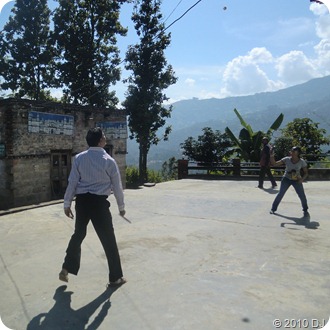


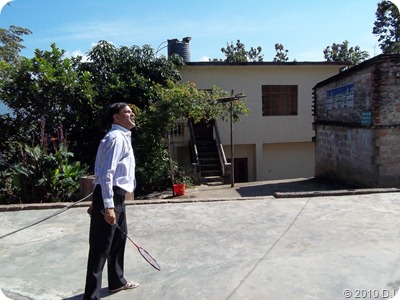

So, what are your answers? Post them as comments and I’ll verify them for you. The first one to spot them all receives a happy-new-year-wishing-call from me!

For those who don’t know , this game is called
Superspace Explorer, Path Localizer, Discharged Photographer, Outdated Programmer, Jack of 'all' Solvers
Saturday, December 11, 2010
Wait, WHAT??? Wow!!!
This was all I could muster when one of my sisters (R from the previous post) recently said that Sudoku Solver 6.6 runs on her laptop but AcBook 3.9 does not!
So this post is going to be about MATLAB and Miscellany. Recently, I saw this guest post on Loren Shure’s blog at “The MathWorks”. That post talks about using Speech Synthesis (among other things) functions from .NET library. (You probably know where I’m heading!) So, I commented on the post regarding my own encounter with .NET and its Speech Recognition functions.
My .m files are useless to others as I don’t include comments in them and often I myself (after a respectable span of time) don’t remember how they do whatever they do (one of the many reasons why SS 6.x has not yet become at least SS 7.0!). For example, I don’t understand anymore how the brute force algorithm for solving a Sudoku is implemented in the corresponding .m file. (The full arsenal of SS 6.6 consists of 11 .m files totaling ~2000 lines and yes, ‘end’ takes one line and there are almost no blank lines!)
Anyway, enough boasting! So, I’ll present here (with comments) the code snippet I use in my ‘full-fledged’ SS 6.6 for recognizing the spoken numbers:
%% Import Speech Classes
NET.addAssembly('System.Speech');
import System.Speech.Recognition.*;
%% Initialize SRE
SpRec=SpeechRecognitionEngine;
SetInputToDefaultAudioDevice(SpRec);
ts=System.TimeSpan(0,0,3); %Don’t ask what this does!
SpRec.InitialSilenceTimeout=ts;
%% Create Grammar
words={'one','two','three','four','five','six','seven','eight','nine'};
str=NET.createArray('System.String',9);
for n=1:9
str.SetValue(words{n},n-1);
end
choices=Choices(str);
GB=GrammarBuilder(choices);
grammar=Grammar(GB);
LoadGrammar(SpRec,grammar);
%% Test the Words
%rec=EmulateRecognize(SpRec,'ONE');
%% Real Speech Recognition
disp('Speak Now...');
rec=Recognize(SpRec);
%% Result
Speaker=System.Speech.Synthesis.SpeechSynthesizer;
Speak(Speaker,rec.Text);
The success of the above code depends mainly on your PC and you’ll find that out pretty soon (or maybe not)!
Now, let’s talk about miscellany. Recently, (note to self: used this word too many times, increase vocab) I realized that I’ve nudged many people (over the past few years) to do certain things and statistically speaking, none have done so! Let me give you some details:
I’ve asked a lot of people (friends & family) to use SS 6.x and AcBook 3.x (new releases of both will be made public by the start of new year) over a span of more than 5 years. Here are some disheartening (for a programmer) and funny (for a Sketchbook reader) ‘results’: Shantanu switched from Windows to Linux after I ‘presented’ AcBook to him on his Birthday! R wanted to use it till she developed her own program using .NET, VisualBasic, etc. but her PC won’t run it as mentioned above! S (my brother from last post) will not install Java on his PC! (ohh! Spoiler Alert!) DQ quite reluctantly agrees to beta-test every new version but then forgets they are even installed on his PC! and the list continues…
I’ve asked a lot of people to watch / read Sketchbook but all of them say (in one way or other): “What the hell is this?”
I’ve asked a lot of people to watch / read Rurouni Kenshin following ‘my sequence’ and none of them have ever successfully done it! Shantanu did come close to doing that but then he ‘lost interest’ around VizBig Vol. 2!

I’ve asked a lot of people to read Hindi poems, whose links I post on Google Buzz and most of them do read them. I feel really glad about that especially when Shantanu ‘thanked’ me for sharing those links!
 Superspace Explorer, Path Localizer, Discharged Photographer, Outdated Programmer, Jack of 'all' Solvers
Saturday, December 4, 2010
COME and GONE… (III)
Biratnagar (1-night stay over): We were joined by ‘them’. They were my father’s nieces (father’s sister’s daughters), i.e. two of my ‘many’ sisters (let’s call them B & R). I find it quite irritating that in Hindi (or Nepali), almost everyone (at least of your own generation-al level) can be referred to as your brothers & sisters with a prefix (specifying whose sons or daughters they are) if needed but in English, they are cousins, nephews, nieces, etc. and you’ve got no clue what the relation is at the higher generation-al level. I don’t think that made any sense and that’s precisely my point!
Kathmandu (13-days stay): The first week was the week leading up to Diwali / Deepawali, about which I’ve talked about in an earlier post. I also met one of my brothers (father’s brother’s son, let’s call him S) after a long time. He pointed out that I’m fat and I pointed out that it needn’t be pointed out! We obviously went to Pashupatinath temple and also to Panchmukhi Balaji temple* (Google maps can now show the exact location of this temple. You get near it by searching for ‘tinpiple’ and zooming on a 360° turn in the ‘Arniko Highway’.) like last time but did not go to the Garden of Dreams, which I do regret.

Apparently, B & R were lucky enough to visit it after I (& S) left. I’m also told that in their 3-weeks stay at KTM, they took nearly 750 photos which is quite astonishing but when I think about it, it’s not that impressive. They are wasting a lot of ‘time’ & space on the memory card! Here’s why: After their 2-weeks stay, they had nearly 420 photos, which I brought with me. As I’m ‘fond’ of organizing my photos on ‘Windows Live Photo Gallery’ (or ‘wasting time’ as B & R put it!), I started sorting through their ‘mess’ and after I was done with that, I was left with 253 photos ‘only’! This huge reduction is due to two reasons: (i) Their Sony Cyber-shot takes dual shots if it ‘realizes’ that the lighting conditions are unfavorable like when indoors which was most of the time and when there is strong backlight outdoors which was also most of the time at KTM while we’re there! So one can safely delete one of those two snaps; (ii) One of them (R) does not press the shutter-release button half-way to check if the ‘subject’ is in focus! She just presses the button all the way taking the phrase ‘point-and-shoot’ a little too literally! So some of the snaps she ‘shot’ were out of focus and ‘had’ to be ‘pointed out’ of my laptop(s)!
So, to summarize my stay at KTM: I got some shopping done, ate sweets, met with other relatives, got my eyes checked, ate sweets, postponed my wedding, celebrated Diwali @ Home, watched Sketchbook with B & R (they were neither impressed nor repulsed by it!), ate (pieces of) a huge heart-shaped cake that somehow reminded me of sweet potatoes, attended a picnic, played badminton, tweaked AcBook & Sudoku Solver, ate sweets, taught something new (like how to convert feet to inches and there are 8 planets now!) to a kid, gave my mother ‘golden jewellery’ as a gift for the first time and ate ice cream labelled ‘Blind Love’ after a long time. After having so much fun, I had to leave KTM due to my ‘doctor’s’ advice: “Too much fun is injurious to my well-being”. So I left for
New Delhi (in transit): This is the last one at least on this trip! I came up from the Arrivals Terminal to Departures Terminal and stayed for nearly 6 hours in an enclosure named ‘Visitors’ Lounge’ just besides the check-in counters. But I had to go out of the building and come back in through a different gate for check-in! Anyway, no hassles this time around when I boarded the flight to
Abu Dhabi (in transit): “Wow! Didn’t we take our shoes off when we entered this terminal?” exclaimed a guy when we were asked to take them off once more to enter the waiting area for gate xx, from which we were supposed to board the plane. He seemed pissed but I just found it amusing! 
Stony Brook (14th Nov): Railroad Route bus to Chapin Apartments was running on that (Sun)day and I’m back safely and soundly to tell you about whatever I’ve told you in the last three posts! I present to you now the final album that captures almost every aspect of my
*Two albums linked in this post are not accessible to / by everyone. If you don’t see the photos, try logging into Picasa using your Gmail ID. If you don’t see them even then, tell me and I’ll send you a personalized link after assessing your eligibility! Thank you for your understanding…
Superspace Explorer, Path Localizer, Discharged Photographer, Outdated Programmer, Jack of 'all' Solvers